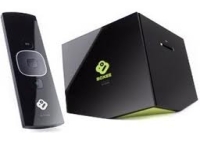
 D-Link Boxee
Box Set-Top-Box
D-Link Boxee
Box Set-Top-Box

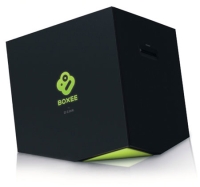
"We get it – you want to the freedom to watch whatever you want on your TV: Movies, TV Shows, Sports, but also any other video that is available online. You want to do it without having to connect a computer to your TV or use a keyboard and mouse. We’re all over it. The Boxee Box by D-Link: watch, organize, share – you are now in full command of your TV for the first time. No rules, no contracts."
D-Link Boxee Box: The Set-Top-Box to Rule Them All
Before getting into the specs let's look first at some of the ways your data is accessed with the D-Link Boxee Box. It's setup to use something that your familiar with from Windows, and that is the locations of My Music, My Videos and My Pictures. So if you have media in these folders, then you can easily use them right away.
Playing your local media is
simple. If
you have movies in My Videos folder you just click the Movies icon on
the Home Screen. Boxee Box will display all the moives it has found
from your My Videos directory. Select the movies your looking for and
select Play. The same goes for your Music and Photos.
Boxee Box Specs: Playing Internet Media
Playing internet media is one of D-Link Boxee Box's most powerful features. If your looking to watch shows from the last season of 'Lost'. All that you have to do is click on TV Shows from the Home Screen. You'll be presented with the TV Show Library. All popular shows appear near the top. If your show is not immediately available then go to Search menu and type 'Lost'. Select the show you would like to watch and select Play.
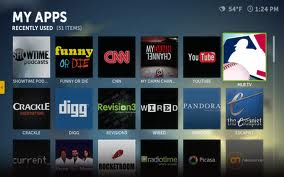
Boxee Box Specs: You Want Apps?
Also with the Boxee Box are Apps. These apps are designed for different purposes. For instance there is an App for Netflix that will allow you to access your account and play movies directly from Netflix. Pandora is another App that performs the same way.
The RF chip by Nordic
supports the
remote control experience is NOT dependent on line-of-sight and can
work from anywhere in the house. 802.11N wireless chip is provided by
Broadcom. Some of you may be wondering about a hard-drive. There is
none. However D-Link has added a USB port for your choice of storage
devices.
Here are your Specs A Glance:
-
Dimensions (LxWxH): 4.5" x 4.5" x 4.6"
-
Language Support: English, French, German, Italian, Spanish
-
Network Protocol Support: IPV4, ARP, TCP, UDP, ICMP, DHCP Client, DNS Client, DDNS Client, HTTP Server, Samba Client, RTP/RTMP, VPN: PPTP, DLNA 1.5 (DMP)
-
Wireless: 802.11n/g/b
-
Ports: HDMI 1.3, 10/100 Fast Ethernet, 2x USB 2.0, Optical Audio (S/PDIF), Analog Audio (RCA L/R)
-
Memory Card Support: SD, SDHC up to 32GB, MMC
-
Audio Formats: MP3, WAV/PCM/LPCM, WMA, AIF/AIFF, AC3/AAC, OGG, FLAC, DTS, Dolby Digital/Dolby True HD
-
Video Formats: Adobe Flash 10.1, FLV/On2 VP6 (FLV/FV4/M4V), H.264 AVC (TS/AVI/MKV/MOV/M2TS/MP4), VC-1 (TS/AVI/MKV/WMV), MPEG-1 (DAT/MPG/MPEG), MPEG-2 (MPG/MPEG/VOB/TS/TP/ISO/IFO), MPEG-4 (MP4/AVI/MOV), DivX 3/4/5/6 (AVI/MKV), Xvid (AVI/MKV), WMV9 (WMV/ASF/DVR-MS)
-
Image Formats: JPEG, PNG, GIF, BMP, TIFF
-
Playlist Formats: M3U, PLS, WPL
-
Subtitle Formats: SRT, SUB, SSA, SMI, ASS
-
Supported Resolutions: H.264: 1080p at 30 fps, 1080i at 60 fps; WMV9/VC-1: 1080p at 30 fps, 1080i at 60 fps; MPEG4: 1080p at 30 fps, 1080i at 60 fps; MPEG2: 1080p at 30 fps, 1080i at 60 fps
-
Two-Sided RF Remote: with 4-way navigation and full QWERTY keypad